RWJ Solutions AB
SVSign in
MODELS. PROGRESS. PERSPECTIVE.

RWJ Solutions.

Digital tools & surveying expertise for construction

See the progress.
In your IFC model.

IFC / DRAINAGE
Preparing the model…
0%
Demonstration progress
Local IFC excerpt · Illustrative progress
Follow the progress automatically
Our tools / RWJ TrackerRWJ TRACKER / PRODUCTION TRACKING

From completed objects to surveyed pipe sections. RWJ Tracker brings production tracking into a visual workspace in your browser.

Private pilot. Sign in with your assigned account.

Explore the features ↓
RRWJ TRACKER
Simplified product demo
Demo projectDrainageProduction tracking
Model view
Loading the IFC view…
0%Illustrative progress

Local IFC excerpt · Illustrative status · No project data is saved

TRY THE WORKFLOW

From a click.
To a complete picture.

Interactive illustration · Example objects and dimensions, not extracted from the IFC view above. Nothing is uploaded or saved.

01 / STATUS

Select. Update. Done.

Click a pipe. Mark it complete or adjust its progress with the slider.

▣ RWJ TRACKERDrainage · IFCAnimated demonstration
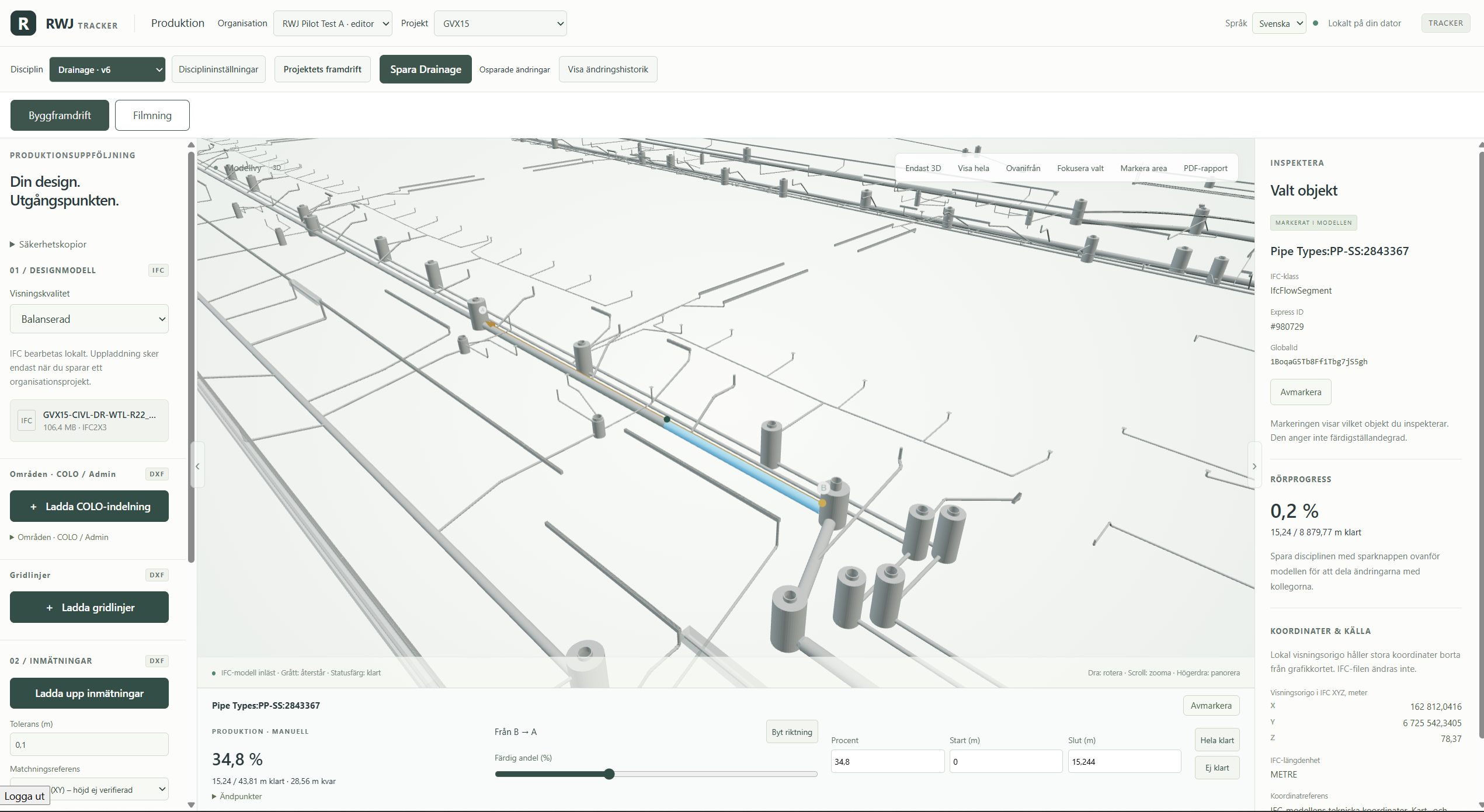
Tracker IFC view with a selected pipe
Click the pipe
Pipe Types:PP-SS:2843367 Selected pipe · 43,81 m
PRODUCTION · MANUAL0 %0 / 43,81 m

Animated illustration based on your Tracker screenshot. Only the selected pipe is filled.

02 / DXF → IFC

From survey to progress.

See an example of how a DXF survey can be matched to pipes and update their progress automatically.

▣ RWJ TRACKERDrainage · DXF → IFCAnimated demonstration
0%Illustrative progress
Drag and drop the DXF file

Animated illustration based on your Tracker screenshot · Simulated matching

03 / IFC DATA

The details behind the model.

Track manholes by count and pipes by length. See completion by object type, system and dimension — grouped as in RWJ PDF reports.

▣ RWJ TRACKERProduction summaryExample data
IFC / DRAINAGE

Every quantity. In context.

Complete / total · Grouped as in the RWJ PDF reports

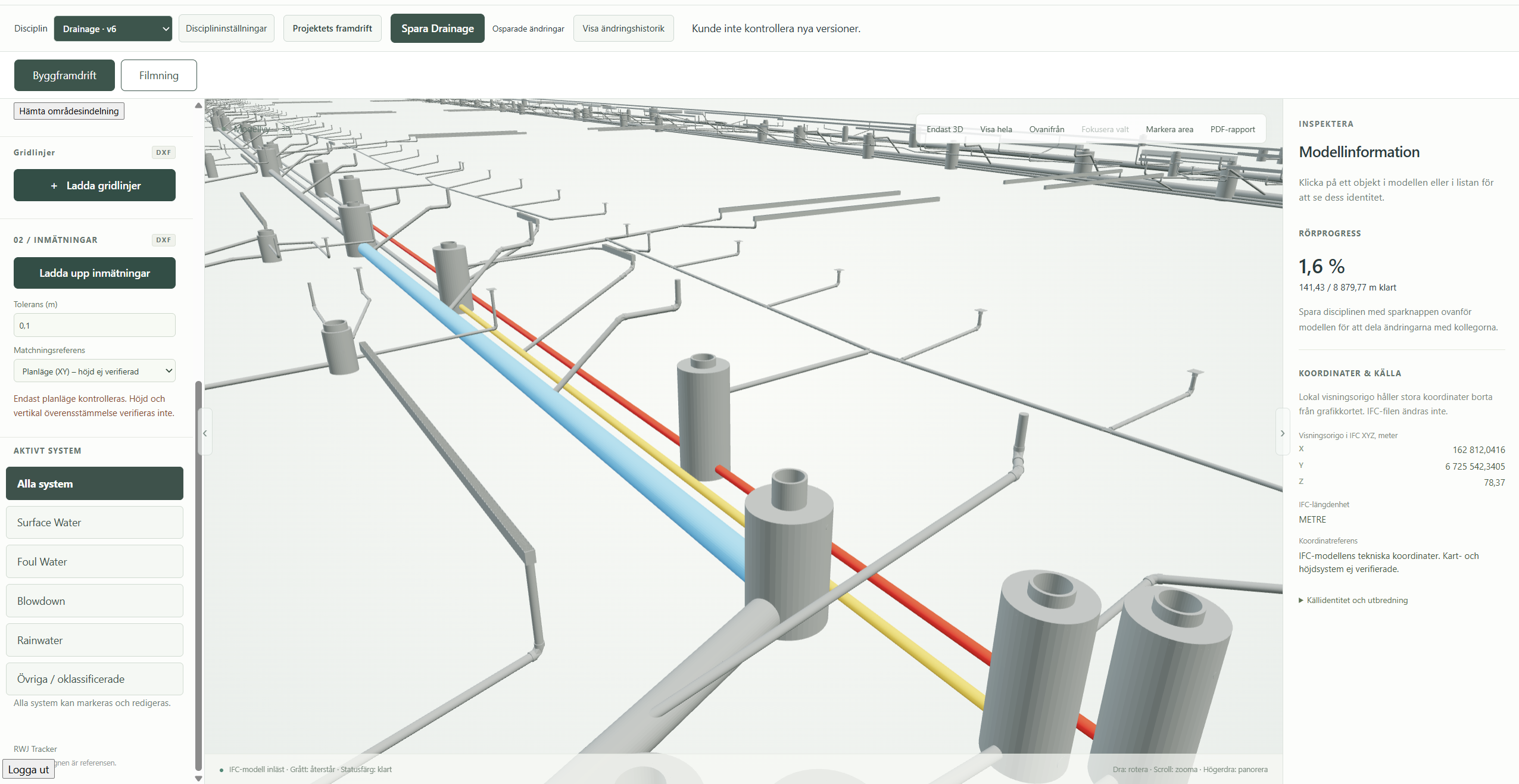
Tracker model with blue, yellow and red pipe sections
Same pipe. Same colour.The model colour follows the system into the report. Grey shows remaining sections.
MANHOLES & OBJECTS Count
Foul water manholeØ 1000 mm
2 / 32 pcs6.3 %
6.3 %
Surface water manholeØ 1200 mm
8 / 24 pcs33.3 %
33.3 %

Object progress is based on the number of fully completed objects.

PIPES Length
Foul WaterPipes by system and dimension⌄
156 / 480 m32.5 %
32.5 %
FW160Ø 160 mm
96 / 240 m40 %
40 %
FW200Ø 200 mm
60 / 240 m25 %
25 %
Surface WaterPipes by system and dimension⌄
108 / 360 m30 %
30 %
SW250Ø 250 mm
72 / 180 m40 %
40 %
SW315Ø 315 mm
36 / 180 m20 %
20 %
BlowdownPipes by system and dimension⌄
64.9 / 944.4 m6.9 %
6.9 %
BD250Ø 250 mm
64.9 / 944.4 m6.9 %
6.9 %

Pipe progress is weighted by length. Expand a system to see its dimensions.

Illustrative quantities · Not extracted from the model above

A CONNECTED WORKFLOW

From updates in the model
to your next project meeting.

01

Models by discipline

Separate IFC models for Drainage, Electrical, Telecom, Structural and Mechanical.

02

Completed work in the model

Mark entire objects as complete or record partially completed pipe sections.

03

Progress from survey data

Use DXF surveys as input for production tracking.

04

Areas and summaries

Gridlines and COLO/Admin areas. Summaries by area, system and dimension.

05

Reports and history

PDF reports with a model view and selectable summaries. Saved versions with user and timestamp.

06

Progress and CCTV

Compare versions over time. Track Drainage inspections through CCTV protocols and manual entries.

Give progress its context.

Return to a saved version and compare what has changed. The model and summaries help the project team review the same information.

ACCESS FOR YOUR PROJECT TEAM

Your project.
Your users.

The initial customer journey uses individual sign-in and assigned licence seats. Five users need five seats. Project read and edit permissions are managed separately from the licence seat.

Organisation and user access are set up with RWJ Solutions. This proposal does not include self-registration or online payments.

FROM FIRST CONVERSATION TO PROJECT

A shared starting point.
A clear path forward.

  1. 01

    We discuss your project

    We discuss your models, workflows and progress tracking needs.

  2. 02

    We prepare the organisation and project

    The product owner prepares the organisation, IFC models and user access.

  3. 03

    Your team works in the project

    Assigned users sign in and work according to their project permissions.

RWJ SOLUTIONS AB

Let’s start with
your project.

Tell us how you work today and what you need to track. We can explore how Tracker could fit your workflow.
Book a demonstration